Lasustennis Club Ladder Games
A system that took over a tennis club’s hand-run ladder competition by drawing the pairings, scoring every match and publishing the standings online. Rebuilt in 2026.
- Sole developer
- 2023 · Rebuilt 2026
- Solo: design, build and deployment
- 2026 version live
Context
The tennis club where I play runs a weekly ladder competition, and it used to be organised by hand.
On ladder days, the players who turn up are paired into matches. Every match is five games long (it ends 3–2, 4–1 or 5–0), and the games you win go straight onto your ladder points. Each player can play a limited number of matches a week: five in 2023, six in 2024, and three now. In 2023 there were singles and doubles; today it’s doubles only.
On top of the weekly matches there are challenge matches. You can challenge a player up to three places above you, and you have to put something down to do it. Win, and your points become theirs. If they have 100 and you have 70-something, you jump to 100 and join them on the table. Lose, and the table stays as it is.
Problem
Done by hand, all of it was stressful: deciding who would play whom, calculating the scores, keeping the totals straight. At one point the paper the scores were written on went missing.
And if you weren’t at the club, you couldn’t really tell what was happening. The only way to find out was to call someone.
Insight
I’d watched how the manual process worked, so I could see exactly which parts a computer should be doing. When I automated it, a lot of that stress simply went away, from drawing the pairs to adding up the points.
How it works
An organiser runs the ladder from a signed-in admin area. Everyone else sees the public site.
Club admin
An organiser runs the ladder from a signed-in admin area. Everyone else sees the public site.
Pairing
The admin ticks the players who are available, and the system pairs them at random.
Results
Scores go in through admin forms: ladder matches, and best-of-three-sets challenge matches. Editing or deleting a result reverses its points.
Points & table
Each player earns the games they won. A challenger who wins takes their opponent’s points total. Standings, head-to-heads and statistics come from queries over the stored results.
Public site
Anyone can check the standings and head-to-head records. No phone call needed.
Weekly images
Entering the first result of a new week closes the previous one: Pillow draws that week’s results and the standings, with each player’s movement since the week before.
Email
The images are emailed to the club’s account as attachments.
The first version was a single Flask application (Python for essentially everything, with Jinja templates for the pages), served by Gunicorn over PostgreSQL. Players, matches, weeks and seasons are separate tables, with a join table between players and matches so singles and doubles are stored the same way.
Engineering
- Random pairings from the players who were available, for singles or doubles
- Ladder scoring, and challenge matches that move points between players
- Statistics from the database: head-to-head records, win ratios, points per match, most points in a day, “bagels” (5–0 wins)
- Week-on-week movement in the table: who rose and who fell
- Results and standings drawn as images after every ladder day (more on those below), and Matplotlib charts for season statistics
- A public join form that emails membership requests to the club
Over the 2023 season the system recorded 457 matches across 38 ladder days, between 23 players. 186 of them were singles, the rest doubles.
The weekly images
The part I’m proudest of: after every ladder day, the system drew two images by itself, the day’s results and the updated standings, ready to be shared.
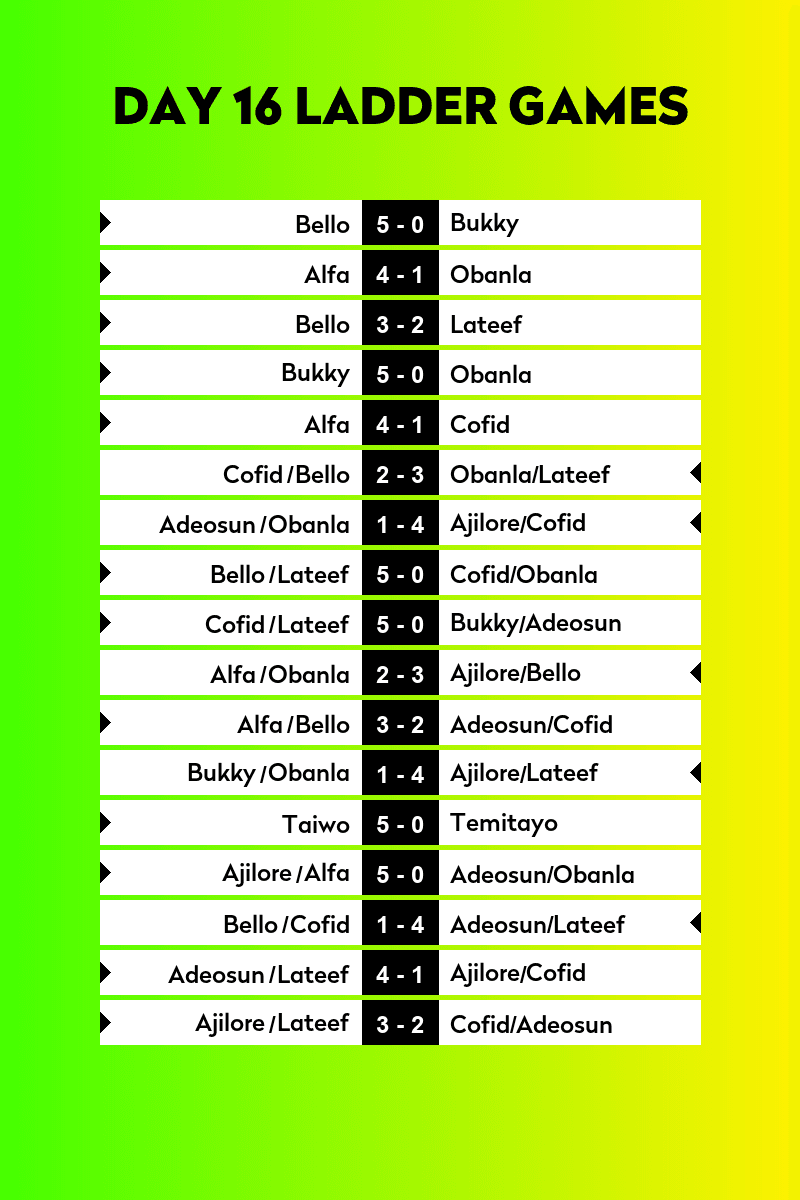
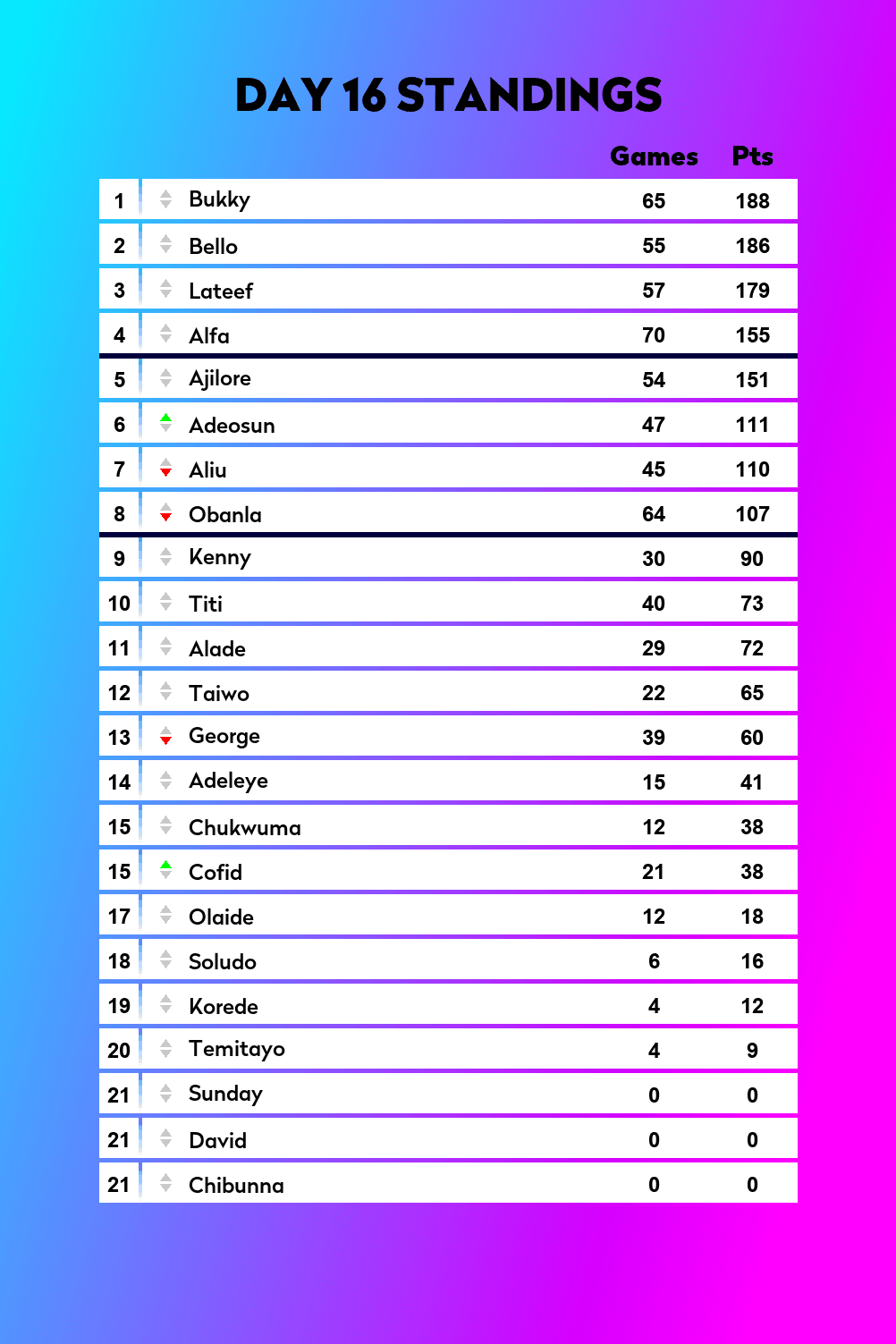
There’s no template or design tool behind them. Everything is drawn in code with Pillow:
- The gradient backgrounds are calculated one pixel at a time, blending two colours along an angle
- Every name and score is measured and centred by hand. Names with letters that drop below the line (g, j, p, q, y) are positioned differently, so every row sits level
- An arrow marks the winning side of each match, and a slash separates doubles partners
- The standings show each player’s movement since the previous ladder day: green for up, red for down, grey for no change. Players on equal points share a position
- When a day has more matches or players than usual, the canvas grows to fit, so nothing gets cut off
Nobody had to remember to make them. Recording the first result of a new ladder day closed the previous one, rendered both images and emailed them to the club.
Difficulties
The hardest part was the challenge matches. Ladder matches just add points, but a challenge is best of three sets, has to work out who won, and then moves one player’s total up to the other’s. And editing or deleting a challenge result has to undo exactly that.
Deploying it was the other battle. It was my first project, I kept running into errors, and I stayed up almost all night working through them until it ran.
Outcome
Tournament participants and viewers grew by more than 100% compared with the previous year.
It wasn’t built for players to track their own performance; I hadn’t added that yet. It was for anyone to see the standings. But because it was a website people could check easily, it brought a lot of interaction to the club: everyone was talking about it, checking it, and sending it to friends: “look at my position.”
I built it between March and August 2023, adding features as the season went on: weekly results, then the table, then head-to-head records.
Rebuilding it in 2026
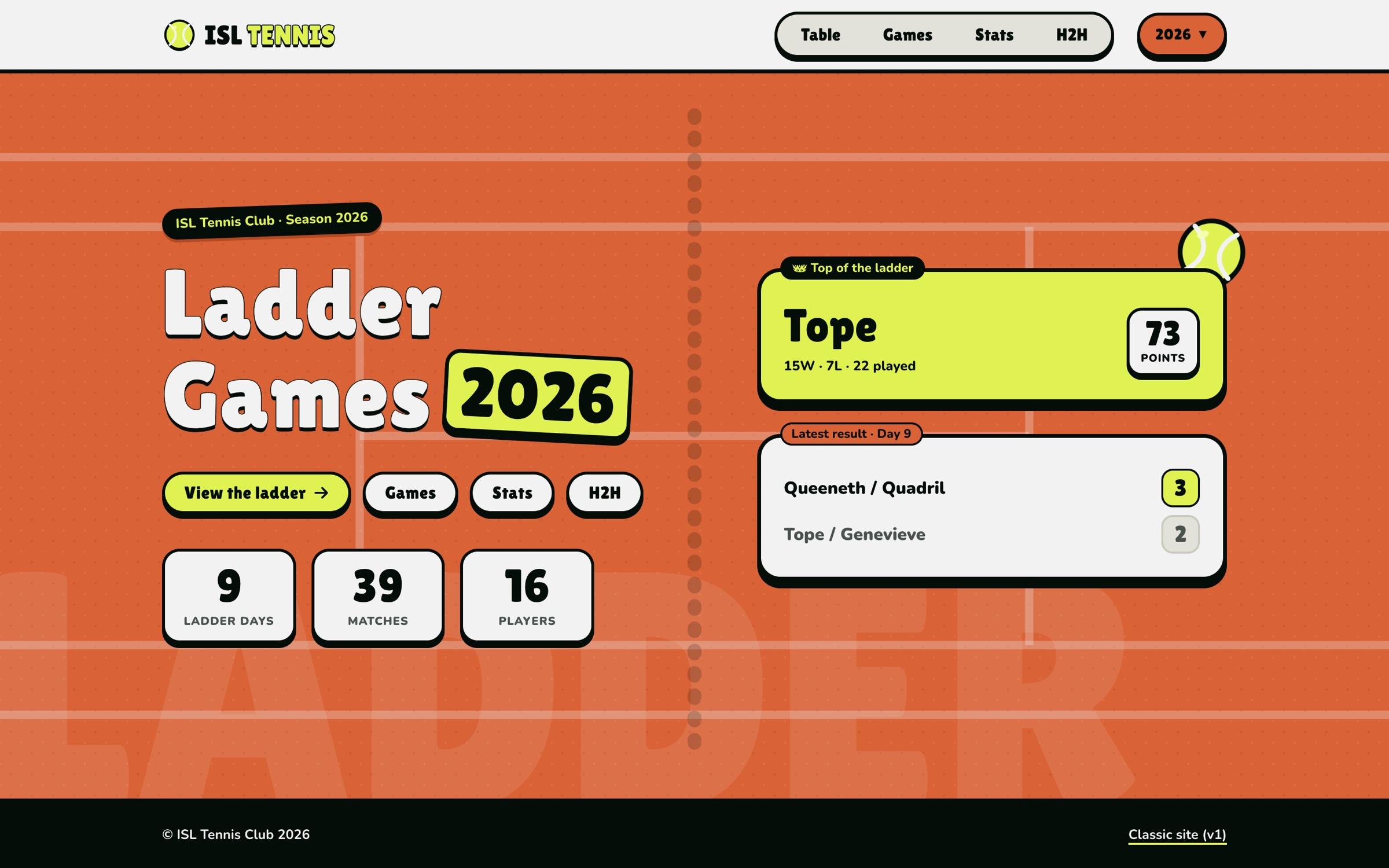
In 2026 I rebuilt it with what I’d learned since: a separate front end and back end, a new design, and the 2023 season’s results carried over so both seasons live in one place.
- Front end: Next.js and TypeScript, with TanStack Query for data fetching and Better Auth for sign-in
- Back end: a FastAPI service with SQLAlchemy over PostgreSQL, serving standings, games, statistics and head-to-head records
- Doubles only, matching how the ladder runs now. The pairing never puts a men’s pair against a women’s pair; if the draw would, it swaps partners so both teams are mixed
- What 2023 didn’t have: player profiles, recent form, a head-to-head comparison, a ladder chart and season-by-season views, so players can follow their own performance
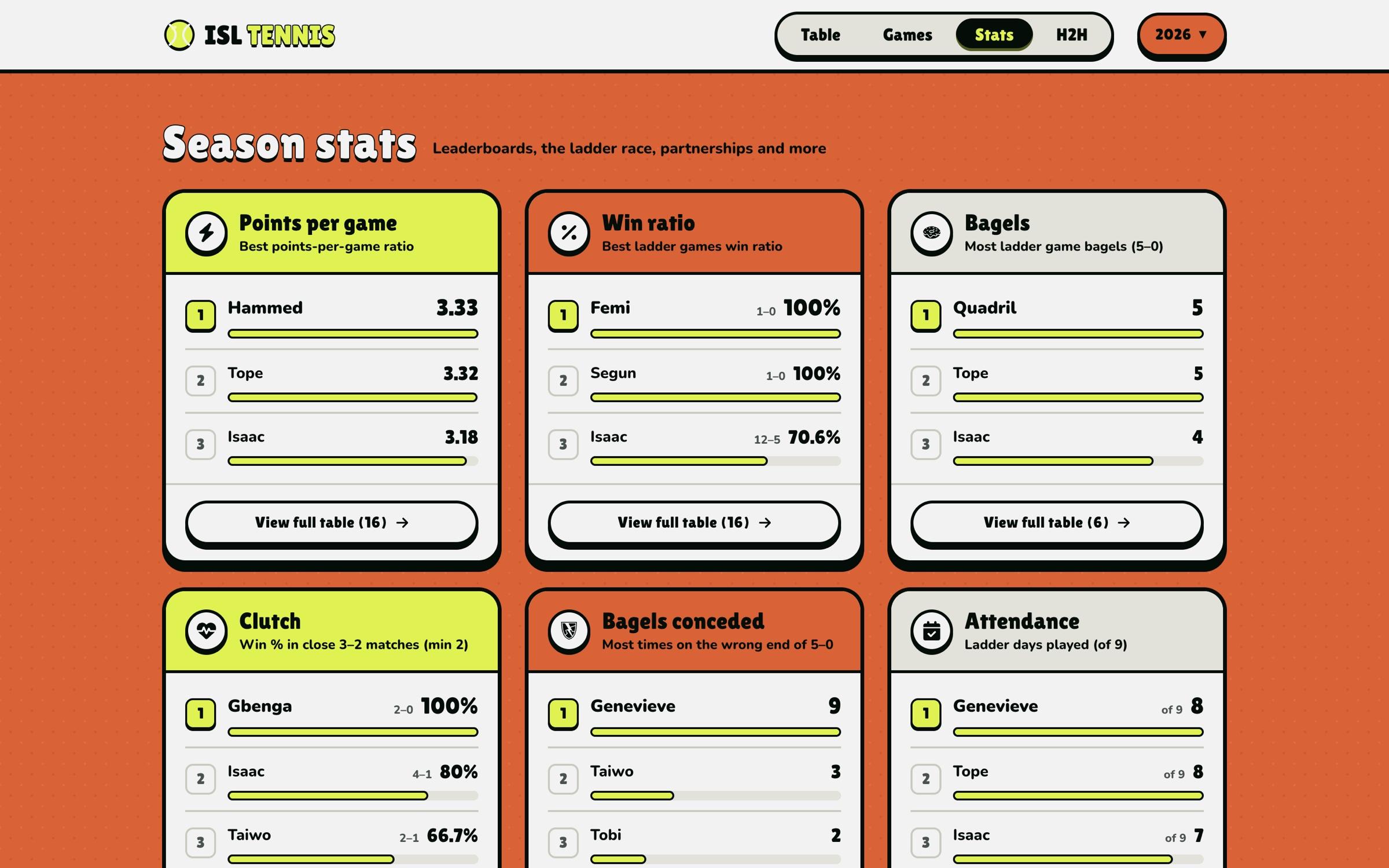
Next is an assistant that answers questions about the stats, like who leads the ladder, how two players compare. The chat interface is built; the assistant behind it is what I’m working on now.
Reflection
If I built the first version again, I wouldn’t do the front end in Jinja. Getting every page to behave meant a lot of permutations and combinations in the templates; a React front end is much easier to manage, and it’s what the 2026 version uses.
I built the 2023 version without any AI help. Every problem, from the challenge logic to lining up each name on the images, I had to reason through myself, and it pushed my logical reasoning and problem solving to their limits. I’m glad I got that experience before AI tools became part of how software is built.
I’m still very proud of it. I saw the impact it had, and I know how much work went into it. It marks the shift from learning how to code to noticing real problems that software could solve.